
What I Learned Fixing My Own Google Business Profile in Bathinda
Fixing my Google Business Profile Bathinda listing taught me something most guides don’t mention: verified doesn’t mean visible. I run a digital marketing business, and my own profile still had basic mistakes sitting in it for weeks.
That’s the thing nobody tells you about local SEO: knowing the theory and actually auditing your own listing are two different things. Here’s exactly what I found wrong, what I fixed, and what any Bathinda business owner should check on their own profile today.
“Verified” doesn’t mean “visible”
My first assumption was wrong, and it’s probably the most common misconception out there: I thought because my listing showed the blue verified checkmark, it was doing everything it needed to do.
It wasn’t.
Verification just confirms Google trusts that you’re the real owner of the business. It says nothing about whether you’ll actually show up when someone searches “digital marketing consultant in Bathinda” or any other service-plus-city term. Those are two completely separate things, and conflating them is probably the single biggest reason local businesses assume their listing is “done” when it’s actually barely started.
Mistake #1: My service area said “India”
When I checked my profile settings, my service area was listed as “India and Bathinda, Punjab, India.”
That’s a problem. Google’s local ranking leans heavily on proximity — how close a business genuinely is to the person searching. A listing that claims to serve an entire country signals the opposite of “local,” even if your actual work is hyperlocal. If you’re a small business in Bathinda, your service area should say Bathinda, and maybe a few realistic nearby towns — not the whole country.
Fix: I narrowed mine down to Bathinda and the nearby areas I’d realistically serve. If your business has a similar setting, go check it right now — it’s a two-minute fix with an outsized impact.
Mistake #2: My hours said “Open 24 hours”
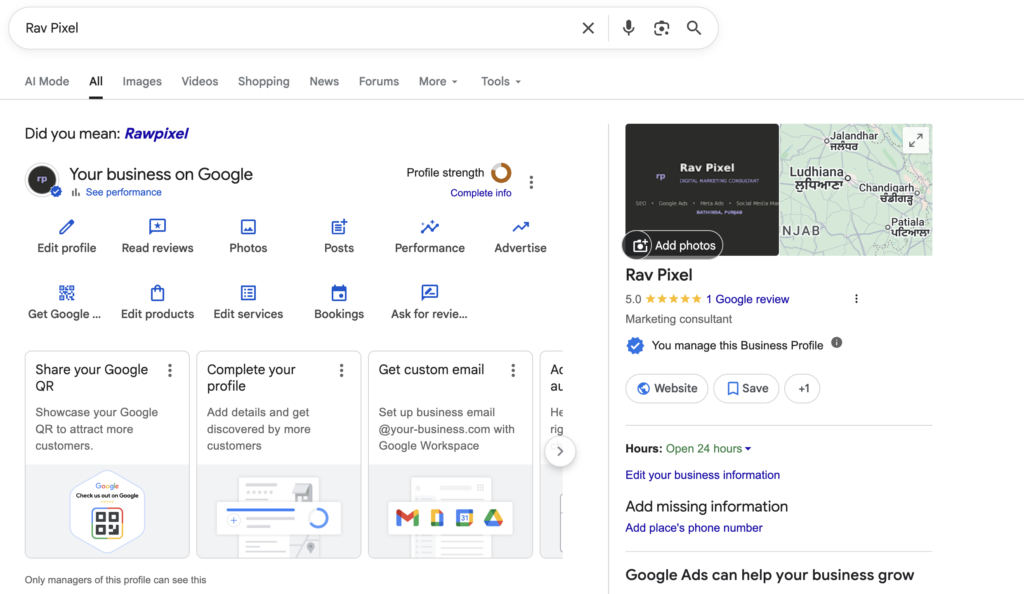
My profile listed me as open 24 hours a day. For a freelance marketing consultant, that’s obviously wrong, and it likely confused whatever relevance signals Google uses to match searches to real business hours.
Fix: I changed it to real, specific hours — 9 AM to 5 PM daily — since that’s genuinely when I’m reachable. If your work is less fixed-schedule, “By appointment” is often a more honest option than either a 24-hour listing or hours you don’t actually keep.
Mistake #3: No phone number
Google’s own dashboard flagged this directly under “Add missing information” — my profile had no phone number attached at all. For any local business, this is one of the most basic trust and contact signals a profile can have, and it was just missing.
Fix: Added it. If you’re a solo business owner or freelancer, your mobile number works fine here — you don’t need a separate landline.
The mistake I haven’t fully fixed yet: reviews
This one’s harder to fix in an afternoon. My profile currently has no reviews, and reviews are one of the strongest local ranking signals there is — right alongside proximity and relevance. There’s no shortcut here except doing the work: asking every client, right after a project wraps, while the experience is still fresh.
If you’re a Bathinda business reading this with the same gap, that’s the honest answer: there isn’t a trick, just consistency.
The test I should have run first
Here’s the part that genuinely surprised me. When I searched my own business name while logged into my own Google account, I saw the full owner dashboard — edit profile, performance stats, the works. It looked like everything was fine.
But that’s not a real test. Being logged in as the owner shows you management tools, not what an actual customer sees. The real test is searching in an incognito window, or better, asking someone else in Bathinda — who isn’t logged into your accounts — to search a generic term like “digital marketing consultant in Bathinda” and tell you what actually shows up.
If you’ve never done that for your own listing, do it before you assume anything about your visibility.
Google Business Profile Bathinda: What to Check Today
If you run a local business in Bathinda and haven’t looked at your Google Business Profile Bathinda listing in a while, here’s the five-minute version of this whole post:
- Open your profile and check your service area — does it say your actual town, or something broader than it should?
- Check your hours — are they accurate, or a default placeholder?
- Is your phone number actually filled in?
- Do you have any reviews, and if not, when did you last ask a client for one?
- Search your business name while logged out — not logged in — and see what a real customer would actually see.
None of this is complicated. It’s also exactly the kind of thing that’s easy to overlook when you’re busy running the business itself — which, admittedly, is exactly what happened to me. If you take one thing away from this, let it be that a Google Business Profile Bathinda businesses actually rank on takes ongoing upkeep, not a one-time setup.
Rav Pixel is a Bathinda-based digital marketing consultant helping local businesses across Punjab with SEO, Google Ads, Meta Ads, and social media management. [Get in touch] if you’d like a second pair of eyes on your own Google Business Profile.